
Many manufacturing companies already use ERP systems for production planning.
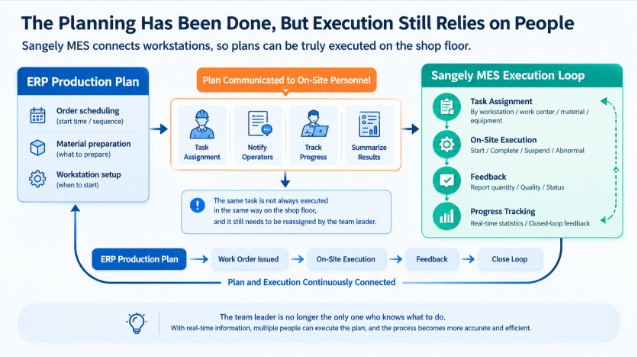
Production schedules may be carefully organized in the office, covering when orders should enter production, which materials need to be prepared, and when each production stage should begin. However, once these plans reach the shop floor, team leaders often still need to reorganize the work: breaking down tasks, notifying workers, tracking progress, and collecting production results for reporting.
This creates a common situation: Production plans are already managed in the system, but actual execution still depends heavily on manual communication.
The problem is not necessarily the production plan itself. The real question is whether that plan can be translated into actionable tasks for specific workstations once it reaches the shop floor.
Sangely MES focuses on bridging this gap by bringing production plans directly to workstations and feeding actual execution results back into the management system.
1. Why Do Team Leaders Still Need to Reassign Tasks on the Shop Floor?
ERP systems and Production Material Control (PMC) departments focus on orders, production stages, materials, and schedules. However, shop floor workers need much more specific information.
Fabric spreading operators need to know which order they are working on, what materials to use, and how much work needs to be completed. Cutting operators need access to work orders and processing requirements. Sewing operators focus on their assigned operations, while final inspection and in-process quality inspection personnel need to manage inspection tasks and quality records.
If a system only sends a general production schedule to the shop floor, individual workstations may still lack clear instructions about what they should do next.
As a result, team leaders must interpret the production plan again and manually distribute tasks to workers. Although production planning has been digitalized, the process of converting plans into executable tasks still relies on manual intervention.
Sangely MES aims to reduce this repeated conversion between production planning and shop floor execution.
2. Why Does Sangely MES Place Such Importance on Workstations?
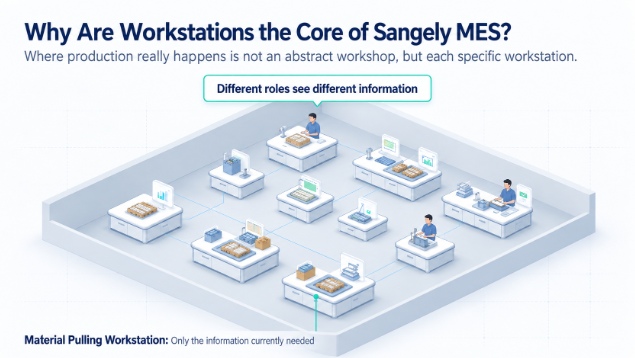
Actual production does not take place in the abstract concept of a "workshop." It happens at individual workstations where specific operations are performed.
Different workstations are responsible for different tasks and require different types of information. If fabric spreading operators, sewing workers, and quality inspectors all have to navigate the same complex management interface, using the system on the shop floor can become unnecessarily difficult.
Sangely MES provides workstation-oriented interfaces designed around actual manufacturing operations, covering scenarios such as material preparation, fabric spreading, cutting, sewing, final inspection, in-process quality inspection, team leader management, and plant management.
The purpose of a workstation interface is not simply to add another screen. It is to present the tasks and information that are directly relevant to the worker's current responsibilities.
For example, a fabric spreading workstation needs information such as the required number of fabric layers, material specifications, order details, and current production tasks. Operators do not need to navigate every order and inventory record available in the ERP system.
Shop floor workers do not need to understand every function in the system. They need to know exactly what to do for the task in front of them.
3. A Workstation Terminal Is Not Simply an ERP Interface Moved to the Shop Floor
A common mistake in manufacturing digitalization is assuming that everything available in the backend management system should also appear on the workstation terminal.
The result is often a complicated interface with too many functions and data fields, making it difficult for frontline workers to use.
Sangely takes a different approach by organizing workstation information around actual production activities.
When workers access their current tasks, they can view information relevant to the specific operation they are performing. Depending on the production scenario, they can also complete related operations and provide execution feedback through QR codes, workstation terminals, mobile devices, or WeChat Mini Programs.
The objective is to make the system adapt to actual production workflows, rather than requiring shop floor workers to master complicated software operations before they can perform their jobs.
This is particularly important for bag, handbag, and leather goods manufacturers, where product styles change frequently and production involves multiple operations.
The more complex the manufacturing process becomes, the more important it is to deliver the right information directly to the relevant workstation.
Instead of searching through an entire production schedule, workers should be able to focus on the information needed for their assigned tasks.
4. Once Tasks Reach Workstations, Execution Results Must Flow Back into the System
A Manufacturing Execution System should do more than distribute production tasks.
If tasks are assigned through the system but completed quantities, production abnormalities, and quality results are still collected manually at the end of each shift, managers may continue to see planned production figures rather than actual shop floor conditions.
Sangely MES supports the creation of shop floor execution records through QR codes, workstation terminals, and mobile devices, depending on the requirements of different production scenarios.
As production tasks are completed, output quantities, production progress, and relevant quality information can be recorded and gradually fed back into the system.
This allows managers to move beyond simply asking, "How much production was planned for today?"
They can also examine available execution records to understand, "How much work has actually been completed, and where does production currently stand?"
This is how ERP production planning and actual shop floor execution begin to connect.
ERP primarily focuses on how production should be organized, including orders, materials, resources, and schedules.
MES takes the next step by supporting how those plans are executed on the shop floor and how execution progress is recorded.
ERP and MES are not duplicate systems. They serve different but connected purposes: production planning and manufacturing execution.
5. MES Does Not Replace Team Leaders — It Reduces Repetitive Communication
Team leaders remain essential to manufacturing operations.
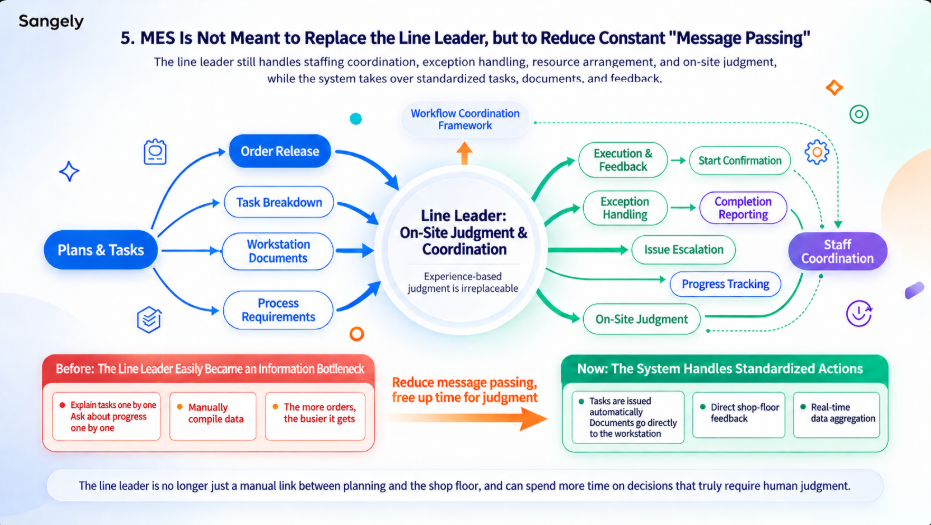
Personnel coordination, abnormal situation handling, resource allocation, and on-site decision-making all require practical management experience. MES is not intended to replace these responsibilities.
What MES can help reduce is the large amount of repetitive communication that team leaders handle every day.
If every new production order requires a team leader to explain tasks again, and every completed operation requires the same person to collect progress updates and consolidate production data, the team leader can easily become an information bottleneck.
This problem becomes more noticeable when factories handle more orders, smaller production batches, and frequent product changes.
Sangely MES aims to let the system handle standardized production tasks, work instructions, and execution feedback wherever possible.
By reducing repeated manual communication and information collection, team leaders can devote more attention to work that genuinely requires their judgment.
The goal is not to remove team leaders from the production process, but to reduce their role as the manual communication link between production planning and shop floor execution.
6. Effective Production Planning Depends on Whether Workstations Can Execute the Tasks
Many manufacturing companies have already addressed the basic question of whether they have a production plan.
Orders are managed in ERP, and PMC departments prepare production schedules. However, if shop floor tasks still depend on verbal instructions, WeChat group messages, manual progress tracking, and end-of-shift reporting, the digitalization process remains incomplete.
Sangely MES extends production management to the workstation level, helping production plans become actionable tasks on the shop floor.
ERP and production planning determine what needs to be done.
MES then helps deliver those tasks to the relevant workstations, including material preparation, fabric spreading, cutting, sewing, and quality inspection.
Once the work is performed, actual execution information can be recorded and returned to the management system.
Instead of having an isolated production schedule, manufacturers can establish a connected execution process:
Production plans reach the shop floor → Workstations receive and execute tasks → Actual results are fed back to management.
For manufacturing companies, even the most detailed production plan must ultimately answer a simple question:
Is production actually being carried out according to the plan?
This is the fundamental issue that Sangely MES aims to address through its workstation-oriented manufacturing execution approach.
Conclusion: The Destination of a Production Plan Is Not a Schedule, but an Active Workstation
Manufacturing digitalization should not be measured only by whether production schedules have been created or whether shop floor reporting functions are available.
The most important connection lies between these two stages: Have production tasks actually reached the workstations responsible for carrying them out?
If a production plan still requires team leaders to break down tasks, explain instructions, and manually track progress after it reaches the factory floor, there is still a gap between office planning and actual execution.
Sangely MES aims to narrow that gap.
It helps different workstations access the tasks relevant to their operations, enables execution records to be captured after work is performed, and provides managers with information to evaluate actual production progress.
A production plan is not truly implemented simply because the shop floor has received it. It becomes actionable when every relevant workstation knows what needs to be done.
This is why Sangely MES approaches manufacturing execution from the perspective of individual workstations.
FAQ | Frequently Asked Questions About Sangely MES and Workstation Execution
1. Why Do Manufacturers Still Need MES If They Already Have ERP?
ERP mainly focuses on orders, materials, resources, and production planning, while MES extends management into actual shop floor execution.
If production plans have already been created but workers still depend on manual task distribution, progress tracking, and result collection, there is still a gap between planning and execution.
MES helps bridge this gap by connecting planned production activities with workstation-level execution and feedback.
2. What Does a "Workstation" Mean in Sangely MES?
A workstation is not simply a computer or a piece of equipment. It represents a specific working scenario within the manufacturing process.
Different workstations provide employees with information relevant to their responsibilities and support corresponding task operations and execution feedback.
The focus is on organizing system functions around actual production activities rather than presenting every employee with the same management interface.
3. What Workstation Scenarios Does Sangely MES Support?
Sangely MES includes workstation scenarios such as:
- Material preparation
- Fabric spreading
- Cutting
- Sewing
- Final inspection
- In-process quality inspection
- Team leader management
- Plant management
Specific workstation configurations depend on each manufacturer's actual production processes and organizational structure.
4. What Shop Floor Reporting Methods Does Sangely MES Support?
Depending on the production process and shop floor conditions, Sangely MES can support task execution and production reporting through QR codes, workstation terminals, mobile devices, and WeChat Mini Programs.
The appropriate reporting method depends on the operational requirements of each workstation.
5. Are Team Leaders Still Needed After MES Implementation?
Yes.
MES primarily helps reduce repetitive task communication, manual progress tracking, and production data collection.
Personnel coordination, abnormal situation handling, and on-site production decisions still require team leaders and their management experience.
6. What Is the Difference Between a Workstation Interface and a Production Dashboard?
A production dashboard primarily helps managers understand what is happening across production operations.
A workstation interface focuses on what frontline workers need to do at their specific workstations.
Production dashboards focus on visibility, while workstation interfaces focus on execution.
They serve different users and operational purposes.
7. Does Sangely MES Automatically Assign Tasks to Every Employee?
Not necessarily.
Sangely MES can support the delivery of production tasks to different workstations. However, actual personnel assignments still depend on production scheduling, manufacturing processes, employee capabilities, and on-site management requirements.
Workstation-level task management should not be confused with fully automated employee assignment.
8. When Should a Manufacturer Consider Workstation-Oriented MES?
If production plans consistently require team leaders to communicate tasks verbally, distribute instructions through WeChat groups, manually track progress, and consolidate results after each shift, it may be worth evaluating workstation-oriented MES.
The most practical question is:
When a production plan reaches the shop floor, does the system continue to support its execution, or does the information still need to be manually communicated all over again?
For manufacturers facing this challenge, workstation-oriented manufacturing execution can be an important step toward connecting production planning with actual shop floor operations.